Speed to Conversation, Not Speed to First Reply: The B2B Guide to Speed to Lead
Speed to lead is the time from a buyer raising a hand to the first useful reply, not the auto-reply. How to measure it in HubSpot and Salesforce, what good looks like, and a five-day plan to fix the slowest channel first.

In this article
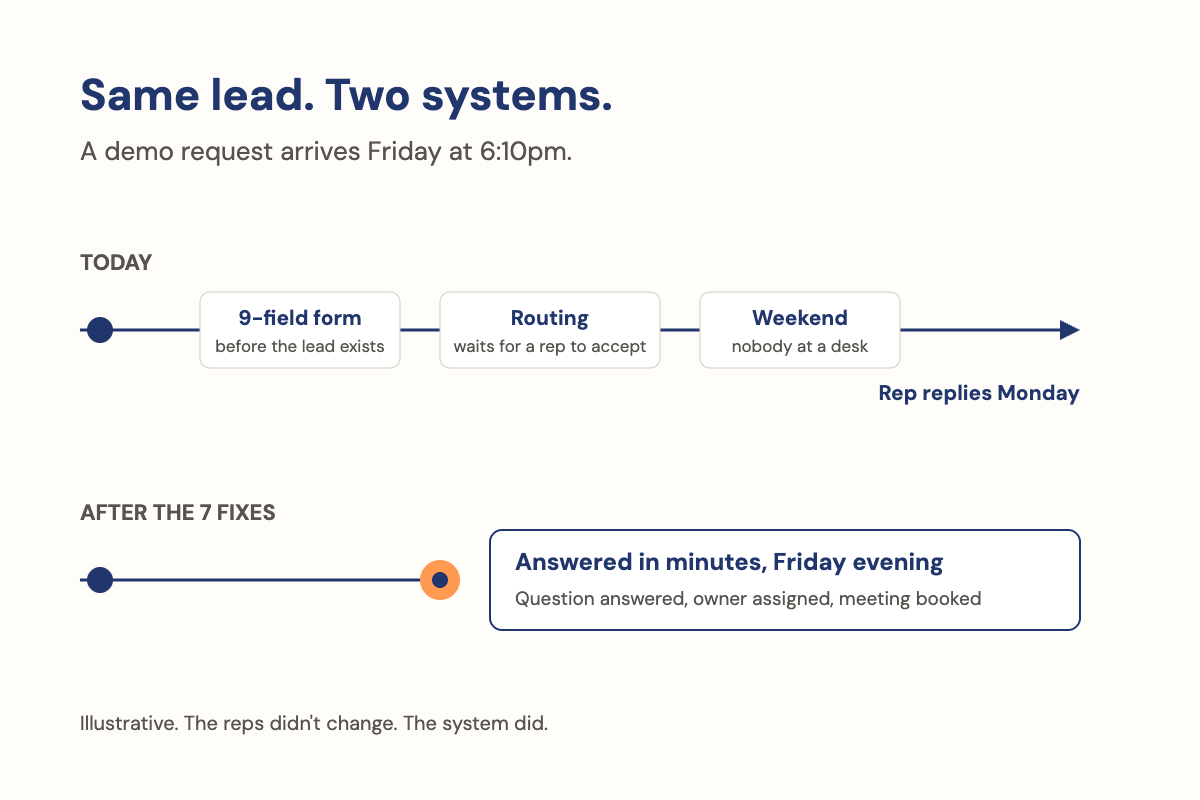
Speed to lead is the time between a buyer raising a hand (a demo form, a chat, an ad lead form, a call) and the first reply that actually answers them or offers a next step. Not the first message your system sends. Your dashboard says under a minute because the auto-reply fired; the buyer says nobody got back to her, and you are both right.
Measure speed to lead to the first useful reply, on every channel and at every hour, and make that first reply an answer with a next step.
This is the hub of our speed to lead series. Each piece below goes deeper on one part:
- Data Speed to lead statistics
- 7 fixes Reduce lead response time
- After hours After-hours lead response
- Follow-up Lead follow-up
- 16 emails Sales follow-up email templates
- Qualify Qualify sales leads in the first reply
- AI SDR What an AI SDR is
What is speed to lead, and what does it do?
Speed to lead is the time from a buyer raising a hand to the first useful reply. It decides whether demand you have already earned turns into a conversation while the buyer still cares. An auto-reply doesn’t stop the clock. An answer does. Report it as the median, by channel and by hour band.
The formula
- Speed to lead
- time of the first useful reply − time the lead was created
- Clock stops
- at the first reply, from a person or an AI agent, that answers what this buyer asked or offers a next step they can act on now: a time to accept, a link to book, a question to answer
- Report
- the median, not the average, by channel and hour band (business hours, evenings, weekends)
Take Dana (an illustrative case, but you will recognize her). She fills in your demo form at 2:14pm on Tuesday: does it sync both ways with Salesforce?
Doesn't stop the clock
Tue 2:14pm: "Thanks, we'll be in touch."
Nor does "someone will call you by 3pm", a voicemail, or a sequence email nobody wrote for her. By the time a rep replied, one competitor had answered her question in their chat.
Stops the clock
Wed 3:40pm: the rep's reply
"Yes, it syncs both ways. Here's the two-minute clip. Want to see it on your setup Thursday at 10?" It answers her question and offers a next step she can respond to.
The research behind the five-minute rule counted contact and qualification, which are both conversations. I made the full case for measuring speed to conversation in an earlier post; this guide turns that lesson into a method.

How do you calculate speed to lead in HubSpot and Salesforce?
Take the time of the first useful reply and subtract the time the lead was created. Exclude automated sends, convert to the lead’s time zone, and report the median by channel and hour band. Revenue operations can build it in an afternoon from 90 days of leads.
- Define the start event per channel.Form submitted, chat started, call received. For ad lead forms, use the platform's submit time, not the time it synced to your CRM.
- Define the stop event.The first one-to-one reply, connected call or chat turn that answers this buyer or offers a next step. Templates, sequences and holding emails don't count, even with the buyer's first name in them.
- Exclude automated sends.The step most reports skip. In HubSpot, Lead response time and Date of first engagement are a start against Create date, but a logged one-to-one email can register even when it answered nothing. In Salesforce, the lead's Created Date is on the lead, but the response lives on a separate Task or Event record. There is no standard "first useful reply" field, so stamp one: a record-triggered flow that writes the time of the first useful reply onto the lead, then a formula for the gap.1
- Convert to the lead's time zone.A lead at 9pm in Denver is an evening lead, whatever your server thinks.
- Build one report.Median minutes to the first useful reply, channels as rows, hour bands as columns. Most teams find one cell far worse than the rest. That's your first fix.
Classify “useful” and check it. A CRM can’t see whether a reply answered anything, so add a yes/no field, filled by hand for 20 leads a week or by an AI model a person spot-checks. Then pull 20 leads by hand: if the report says four minutes and the inbox says next morning, it is still counting an automated send. Scored this way, Dana’s speed to lead is 25 hours 26 minutes. The old report said zero.
How do I use AI to improve speed to lead? Make the first reply an answer, not an acknowledgement
Use AI to make the first reply an answer. List the 20 questions buyers actually ask, map each one to an approved answer or the minute of a video that answers it, let the AI answer on the buyer’s channel at any hour, and keep the door to a person open.
- List the 20 questions.Owner: your marketing lead, with one seller. Take them from chat logs and calls, in buyers' words ("Does it sync both ways?"), and map each to the asset that answers it, or mark it a gap.
- Choose how to answer.Start with your video library, down to the minute mark; questions it can't answer go back to your experts as the next video. Then an AI walkthrough, a talking AI avatar (emerging; it says it's AI in its first line, every time), or a visual, a document or voice when the question is messy.
- Test before a buyer sees it.Ask all 20, plus five it can't answer. A seller grades each reply. Fix the source answer, not the reply, until the seller would send every one as is.
- Decide what happens when it doesn't know.Never guess. It says so, offers a named person and a time, and logs the question for a weekly review. Re-check answers monthly and whenever product or pricing changes.
Dana’s question again, answered by an AI agent set up this way (illustrative):
- What goes in
- Her form: "Does it sync both ways with Salesforce?", Tuesday 2:14pm.
- Your approved answer: "Yes, two-way sync with Salesforce. Shown in the product demo, from 23:10."
- Your rules: answer first, offer one next step, never guess, send pricing to her territory's account executive.
- What comes out, at 2:14pm
"Hi Dana, yes, it syncs both ways with Salesforce. Here's where our product lead shows it, from 23:10 in the demo. Want to see it on your own setup? I can hold Thursday at 10 or Friday at 2."
- What a person changed
In testing, the first draft said
real-time sync. It isn't, for every object, so the seller removed the phrase from the source answer, and every future reply drops it.
The clock stopped at 2:14pm instead of 3:40pm the next day.

The first useful reply is also the best moment to qualify sales leads in the first reply, without another form. And keep the door to a person open:
- 67%of B2B buyers prefer a rep-free experience.2
- 87%said it is essential for companies using GenAI to provide an option to reach a human agent.3
When the buyer is ready, hand over to a named person who sees the whole conversation. That handoff is where an AI SDR earns or loses trust.
Speed to lead on every channel: forms, chat, ad lead forms, calls and after hours
The same clock runs on every channel; where it starts and leaks changes.
| Channel | Clock starts | A useful first reply | Usual leak | Fix it with |
|---|---|---|---|---|
| Demo and contact forms | Form submitted | Confirms a time, or answers the question in the form | ”Within one business day” | Reduce lead response time |
| Website chat | Chat started | An answer, not an email capture | ”Leave your email and we’ll follow up” | The method above |
| LinkedIn and Meta lead forms | The platform’s submit time | Names the offer from the ad they clicked | Sync lag | Landing page personalization |
| Inbound calls | Call received, or callback requested | A connected conversation, or a callback when promised | The call nobody is free to take | After-hours lead response |
| After hours and weekends | Whenever the buyer chooses | The answer they’d get at 11am on a Tuesday | Nothing until Monday | After-hours lead response |
| No reply after the first touch | Already stopped; the conversation stalled | Adds something new, on their channel | The same note again | Lead follow-up, follow-up email templates |
Does speed to lead matter? Yes, as a floor, not a finish line
It matters because most companies are still slow, and buyers arrive late with a favorite already in mind. A fast, useful reply converts demand you’ve already earned. It won’t win a deal on its own, which is why it has to be useful, not just fast. In a 2026 test, AI agents filled in 6,346 B2B demo and contact forms and timed the replies:
- Two-thirdsof companies never replied.4
- 5%Only 5% of replies arrived within five minutes.4
- 26 to 40 hoursHuman replies averaged 26 to 40 hours.4
In a 2025 survey of buyers, first contact with a seller came about 61% of the way through the journey, and buyers initiated 79% of those engagements.5 The vendor buyers preferred before engaging with sellers still won 80% of deals.5 Buyers prepare, prepare, then decide and sprint. If you’re not there when they sprint, the race is harder to win; if you were never on their shortlist, speed buys you a polite conversation.
What good speed to lead looks like: benchmarks with sources
An older test of demo requests to 114 B2B companies found more than 99% of companies weren’t responding within five minutes.6 The early studies found the odds of making contact fall steeply across the first hour, which is where the five-minute rule comes from.7 A 2007 vendor study of six companies found the odds of contacting a lead were 100 times higher at five minutes than at 30, and it measured contact, not conversion.8 Every figure since the 2011 Harvard Business Review article “The Short Life of Online Sales Leads”, with its caveats, is in our speed to lead statistics.
A target you can adopt this quarter
- A useful reply
- inside five minutes, whenever a system can answer the question
- A person
- inside the hour, whenever one is needed
- At every hour
- not just business hours
How to report speed to lead to leadership
Four numbers, each with its denominator and period:
| Metric | Denominator | Period |
|---|---|---|
| Median minutes to the first useful reply, by channel | All leads created, including after hours | Weekly |
| Share with a useful reply within five minutes, and within one hour | All leads created | Weekly |
| Share never answered | All leads created | 14 days after creation |
| Conversations and held meetings per lead | All leads created | Monthly, from the CRM |
Medians, not averages, and after hours in the denominator: leaving them out is the most common way a green dashboard hides a red week. An AI system reports counts; rates and pipeline come from your CRM, and nobody should promise you a conversion lift from speed alone.
How do I improve speed to lead this week? A five-day plan
Measure on day one, find the slowest channel and hour on day two and pull its questions, remove one handoff on day three, write and test the answers on day four, and use them to cover one gap on day five. Each day feeds the next.
- Day 1. Measure.Build the report above and fill in the scorecard below. Owner: revenue operations. Check: a 20-lead hand pull matches.
- Day 2. Circle the slowest row and pull its questions.Fix it first, even if it isn't your biggest channel. Write down what its last 50 leads asked. Owner: the sales or revenue leader.
- Day 3. Remove one handoff.A manual assignment, a shared inbox, a queue. If leads wait to be assigned, start with lead routing.
- Day 4. Write and test the answers.For the ten most common questions, plus a "doesn't know" reply offering a named person and a time. Owner: marketing, with one seller.
- Day 5. Cover one gap.Usually after hours, with an AI agent or a saved-reply library for whoever is on call (after-hours lead response). Check: submit your own form at 9pm and time the reply.
Then, over 30 days: the seven-step method to reduce lead response time.

| Channel | Median minutes | Useful reply in 5 min (%) | Never answered (%) | Who answers first | First reply an answer? | Owner | Fixed by |
|---|---|---|---|---|---|---|---|
| Demo form | Response time | ||||||
| Contact form | Response time | ||||||
| Website chat | Qualify | ||||||
| LinkedIn or Meta lead form | Response time | ||||||
| Inbound call | After hours | ||||||
| Email reply to a campaign | Follow-up | ||||||
| After hours (any channel) | After hours |
Want the longer version for your team? Download The First Hour: a field guide: five short chapters on the first hour, the demo form, after hours, the handoff, and five fixes.
How Synapsa answers every lead, on every channel, in under a minute
Everything above works with any CRM and any capable AI system. Here is how Synapsa does it.
- It starts the conversation from what the buyer did: a form, a chat, an email, a text or a call.
- It answers from your approved knowledge, with one memory across webchat, email, SMS and voice, so the buyer never repeats themselves.
- It can show a video, send an attachment, or take the buyer to the right page when that’s the best answer.
- It qualifies through the objectives and must-haves you set, rather than a script.
- It routes and books against real calendars, with the right seller for the territory and meeting type.
- It pauses and alerts the people you name the moment a conversation needs a person.
- It logs every conversation to the buyer’s CRM record, so the seller who picks it up sees everything.
- It reports counts: conversations, qualified buyers, meetings booked, follow-ups. Rates and pipeline stay in your CRM.
Across our customer deployments, the average response to inbound leads was more than 24 hours before Synapsa,9 and 44% of inquiries come in after hours.9 On our platform, speed to lead is under one minute.9 And that first reply is the agent answering the buyer in the conversation, from your approved knowledge, not a holding email. We’ve learned this across more than 1M buyer interactions.9 One of our customers, Windermere, put it plainly:
“Our industry is extremely competitive and speed to lead is everything. Our AI reaches out to leads in seconds, quickly confirms meeting intent, and then books them with the proper team member who can move them forward in the sales cycle.”10
Frequently asked questions
What does speed to lead mean?
Speed to lead is the time between a buyer raising a hand, through a demo form, a chat, an ad lead form or a call, and the first useful reply: one that responds to what this buyer asked and either answers it or offers a next step they can act on. A promise of contact, or an auto-reply, doesn't stop the clock.
Is the five-minute rule still true?
The direction holds: the first minutes matter most. But the research behind the five-minute rule counted contact and qualification, meaning real conversations, not replies. Five minutes to an auto-reply is not what it measured. Every source and caveat is in our speed to lead statistics.
Does an auto-reply count toward speed to lead?
No. An auto-reply, a 'we'll be in touch' email, a voicemail or a sequence email nobody wrote for this buyer does not stop the clock. Exclude automated sends from the report, or your dashboard will show seconds while buyers wait a day.
What is the difference between speed to lead and speed to conversation?
Speed to lead, measured the usual way, times the first message out. Speed to conversation times the first real two-way exchange, which is what the original research counted. This guide times the first useful reply, the moment the buyer has something to respond to. That is the earliest point a conversation can start, and it is the part your team controls.
Is speed to lead different in real estate?
The clock is the same: from the inquiry to the first useful reply. The channels differ, with more portal leads, calls and texts. This guide is written for B2B sales and revenue teams, where demo forms, chat and ad lead forms carry most of the volume.
What about speed to lead software and AI?
Any system that answers on the buyer's channel, from approved knowledge, at any hour, and hands over to a person cleanly can do the job. Our guide to what an AI SDR is covers what to look for.
Sources
- HubSpot and Salesforce product documentation. Standard lead fields and where each system records a first response.
- Gartner, B2B buyer survey, 2026. Share of B2B buyers preferring a rep-free buying experience.
- Gartner, customer survey, 2026. A separate survey of customers in a service setting, not B2B buyers.
- Clay, experiment, 2026. AI agents submitted 6,346 B2B demo and contact forms and timed the replies; a vendor experiment.
- 6sense, buyer survey, 2025.
- Workato, test of demo requests to 114 B2B companies.
- Harvard Business Review, "The Short Life of Online Sales Leads," 2011, and InsideSales, 2007. Early studies of contact rates across the first hour.
- InsideSales, lead response study, 2007. Vendor study of six companies; measured contact, not conversion.
- Synapsa platform data, 2026.
- Windermere, customer quote, Synapsa case study.