
Lead Response Time Is Set by Your System, Not Your Reps: 7 Fixes
Telling the team to respond faster doesn't move lead response time, because the delay is built into the form, the routing and the hours you cover. Here are seven fixes, in order, with the owner, the check and a weekly tracker for each.

In this article
You’ve told the team to respond faster, maybe three times this year, and your lead response time didn’t move. That isn’t a motivation problem. Nobody can reply faster than the lead reaches them.
Lead response time is set by your system, not by your reps' effort.
Speed to lead improves when you remove the delays in front of the first reply and make that reply an actual answer. Here are seven fixes, in order. Step 4 is where AI comes in: it writes the first reply in seconds, at any hour, from knowledge you’ve approved, and that’s how you get to minutes without hiring.
- Audit response time by channel and hourOwner: RevOps. Check: 20 leads checked by hand match the report.
- Cut every form field you can enrichOwner: marketing ops. Check: completion rate before and after.
- Route at once, with a fallback ownerOwner: RevOps. Check: owner assigned in under a minute.
- Reply in the channel they used, with an answer and one next stepOwner: marketing lead with sales. Check: the ten most common questions, per channel.
- Cover nights and weekendsOwner: sales leader. Check: a Friday-night test lead gets an answer.
- Ask the 2 or 3 routing questions inside the answerOwner: sales leader with RevOps. Check: every booked meeting has its answers on record.
- Hand over with the whole conversation Owner: sales leader. Check: the seller runs the first call without asking the buyer to repeat anything.
How quickly should you respond to a lead?
Respond with a useful two-way reply within five minutes when a system can answer, and get a person to the buyer within the hour when one is needed, at every hour of the week. Most companies take far longer.
- ⅔When Clay had AI agents fill in 6,346 B2B demo and contact forms, "two-thirds of companies never replied."1
- 5%Of the replies that did arrive, "5% of replies arrived within five minutes."1
Where the five-minute target came from: lead response time statistics.
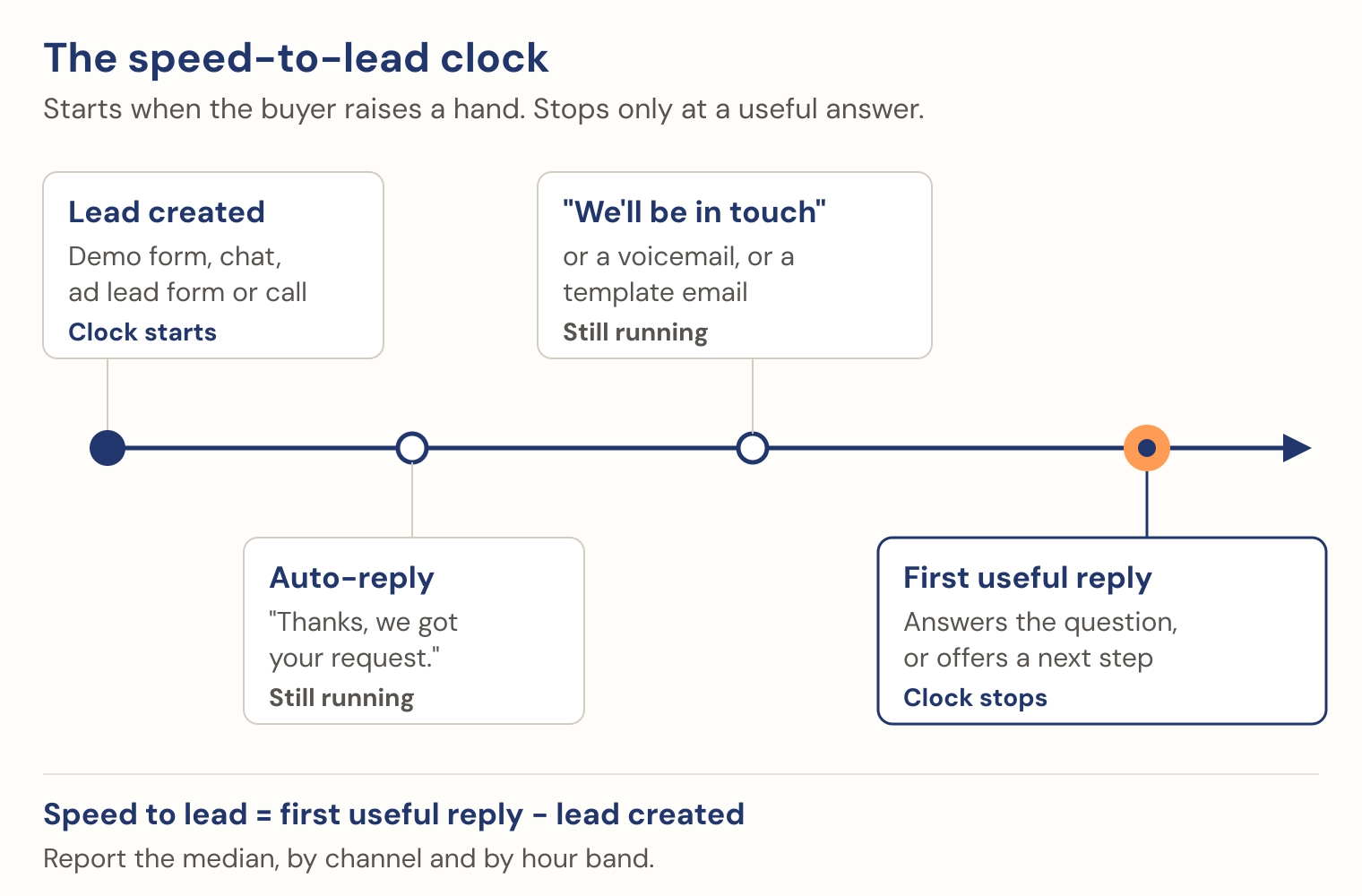
- The clock stops at a useful reply, not at an acknowledgement. I stop it at the first two-way exchange where the buyer gets something useful: an answer to what they asked, or a real time with the right person, sent somewhere they can reply. Auto-replies and voicemails don’t count.
- Speed is a floor, not a ceiling. The buyer can’t tell two seconds from twenty. They can tell whether the reply understood them.
Across a 2025 survey of nearly 4,000 B2B buyers, first contact with a seller came about 61% of the way through the buying journey, and buyers initiated most of those contacts.2 They arrive having done their homework, so an answer holds them and “we’ll be in touch” doesn’t.
Where the minutes go: one inbound lead, from the buyer starting the form to the first useful reply. Next to each delay: the step that removes it.
| Delay, in order | Removed by |
|---|---|
| Form length: nine fields to fill | Step 2 |
| Sync and enrich: lead reaches the CRM | Step 2 |
| Routing: waits for a rep to accept | Step 3 |
| Office hours: after-hours leads wait from Friday 6pm to Monday 9am | Step 5 |
| Writing the reply: someone reads and answers | Step 4 |
Then size what slow costs you (swap in your own numbers after step 1):
What slow response costs (illustrative)
- Inbound leads
- 200 a month
- Never answered
- 15% never get a useful reply: 30 buyers.
- Waited too long
- Another 25% wait more than a day, mostly the ones who wrote on a Friday evening: 50 buyers.
- Would have met
- One in five of those 80, an assumption, not a benchmark
- Meetings lost
- 16 a month, while everyone works just as hard
Step 1: How do you calculate lead response time?
Lead response time is the time of the first useful two-way reply minus the time the lead was created, with both timestamps in the same time zone (UTC is simplest). Leave out auto-replies and unanswered voicemails. Report the median by channel and hour band, plus the share never answered.
What you need: 90 days of leads from your CRM with two timestamps each: when the lead was created and when the first useful reply went out. Your activity history has the second one; you may need to look past the first logged email to find it. Owner: RevOps.
- Tag every lead by channel and by hour band in the lead’s time zone: business hours, evenings, weekends.
- For each lead, find the first reply that answered what they asked or offered a real time with the right person. Skip confirmations and “we’ll be in touch” templates.
- Calculate the minutes between the two timestamps and take the median for each cell.
- Count the leads with no useful reply within 14 days.
| Channel | Business hours (median min) | Evenings (median min) | Weekends (median min) | % never answered |
|---|---|---|---|---|
| Demo form | ||||
| Contact form | ||||
| Chat | ||||
| Ad lead form | ||||
| Phone call |
Then test it yourself: submit your demo form at 6pm on a Friday, chat at 9pm, call on Saturday morning, and note what came back and when.
- Check: work out 20 random leads by hand. If the report disagrees, fix the report first.
- Watch for: auto-replies counted as responses: a median under a minute and a test answered next day.
Rerun the cost calculation with your grid. Those are buyers who asked for help and didn’t get it in time, and they’re the first ones the next six steps reach.
Step 2: Cut form fields so the lead exists sooner
A lead doesn’t exist until the form is submitted. Don’t ask for anything you can look up: remove what you can enrich from a work email (company, size, industry, location), switch on enrichment, and add one free-text question. Owner: marketing ops.
Before: nine fields
First name, last name, work email, phone, company, job title, company size, country, how did you hear about us
After: three fields and one optional
Work email · What are you trying to solve? (free text) · When are you looking to start? · Mobile number, optional, with consent to text
The free-text answer is the important part. It’s the buyer telling you, in their own words, what the first reply should be about.
- Check: completion rate before and after, and five test leads still route correctly.
- Watch for: removing a field routing depends on. If territories route on country, enrich it first.
The First Hour: a field guide covers the demo form in more depth in chapter 2, including which questions to keep for different sales motions.
Step 3: Route leads instantly, without a rep accepting first
Many setups assign a lead, then wait for a rep to accept it: often the longest delay inside business hours, and invisible on dashboards. Owner: RevOps. Write routing in plain language, in this order:
1. If the company already has an owner in the CRM, assign the lead to that owner.
2. Otherwise, assign by territory: [region or segment] goes to [team].
3. Within the team, round robin among reps who are available right now.
4. If no rule matches or nobody is available, assign to [named fallback owner] and alert [team channel].- Check: owner assigned in under a minute for nearly every lead, including test leads for an existing customer, no territory and an owner on holiday.
- Watch for: conflicting rules that leave a lead with nobody. That’s what the fallback owner is for.
More in our guides to lead routing and lead routing best practices.
Step 4: How do I use AI to reduce lead response time?
Let AI answer from your approved knowledge, in the channel the buyer used, the moment they arrive, with one clear next step. The buyer’s question gets answered first. “Thanks, we’ll be in touch” is never the first reply. A person still takes over when the buyer needs one; steps 6 and 7 decide when.
Chat gets an answer in chat; a form gets email, or text where they gave a mobile number and consent; a call gets answered as a call. Here is a Friday-evening demo request, worked end to end (an illustrative company selling a reporting tool):
- What goes in: the record and the rules
- Form answer: "We need to replace our reporting before Q1. Does this work with Salesforce?"
- Arrived: Friday 6:10pm, demo form, work email and mobile number, with consent to text.
- Enriched: mid-market software company, about 300 people, US East.
- Owner, from step 3: Dana, mid-market team.
- Rules: answer from approved knowledge only; say it's AI; ask one routing question; offer the owner's real times; never promise prices, terms or timelines.
- What comes out: the draft, as corrected
"Hi, I'm the AI assistant for the team. Yes, it connects to Salesforce
, and most teams have their first reports running in the first week.: you connect your account and choose which objects to report on, and Dana can walk you through setup for your data. Since you're aiming for Q1, is this for one team or the whole company? That decides who you should speak with. Danaon our mid-market team has Monday at 10am or 2pm open.has Saturday at 10am or Monday at 2pm open." - What a person changes: two fixes, once
Before switching the channel on, Dana replays that Friday request as a test and grades the draft. Two fixes: the draft promised a timeline the rules forbid ("first reports in the first week"), and it offered Monday when the buyer wrote on Friday evening and Dana keeps Saturday slots for inbound. She adds one line to the knowledge, "describe what setup involves; never promise a go-live date", and it applies to every reply after.
What it replaced: “Thanks for reaching out! A member of our team will be in touch within one business day.”
Owner: marketing lead, with sales. Whatever answers (an assistant in your CRM or chat tool, an email and text responder, or an AI agent platform) must answer only from approved knowledge, reply in the buyer’s channel, hand over to a named person, and write the exchange to the CRM record.
- Gather the knowledge.Your best rep's answers to the last 90 days of questions, product and integration facts, objections, and what you can say about pricing.
- Write the instructions.What the first reply must contain (the answer, one routing question, one next step), how it introduces itself as AI, and what it must never do: quote prices beyond your published page, promise terms, or guess when the knowledge doesn't cover a question.
- Name the escalation.When it can't answer or the buyer asks for a person, it says so and alerts the owner.
- Have sales approve it.A sales leader grades answers to the ten most common questions, per channel, before go-live.
- Switch on one channel first.Your slowest or busiest, usually the demo form by email.
Watch for: the AI that can’t help. Across more than a million buyer interactions we’ve seen, fewer than 2% are with people upset that they’re talking to AI.3 Buyers are about 10 times more often frustrated that the AI couldn’t help, because knowledge was missing or it couldn’t reach the information it needed.3 Spend your setup time on the knowledge.
Step 5: Cover nights and weekends
Look at the evening and weekend columns of your step 1 grid. Across our customer deployments, 44% of inquiries come in after hours.3 Letting buyers move forward only when somebody gets back to the desk on Monday isn’t acceptable anymore, and it doesn’t have to be. Owner: sales leader.
- Decide what each after-hours lead gets: a booking; an answer, then a booking; or something useful now and a person in the morning.
- Let inbound replies go out at any hour; hold outbound follow-up for the buyer’s morning, under quiet hours you set.
- Check: your Friday-night test lead gets an answer and a next step before Saturday.
After-hours lead response has the full six-step method, including what to say in the first reply and how to set quiet hours.
Step 6: Qualify in the first reply, not on a later call
Move the questions that decide where a lead goes into the first reply, inside the answer, not as a gate in front of it. Owner: sales leader, with RevOps. Pick the two or three questions that decide routing (usually what, how soon, how big) and describe who goes where in plain language, not a points score:
| If the buyer… | They get |
|---|---|
| Fits and is ready to talk now | A booking with the right seller, from step 3’s rules |
| Is early in their research | Something useful now and a follow-up |
| Isn’t a fit | Self-serve help, without taking a seller’s time |
- Check: every booked meeting has its answers on the CRM record before the call.
- Watch for: asking before answering. That turns the reply back into a form.
As Scott Sutter at Helium SEO put it: “The qualification of that lead is so much more valuable than just getting a web form.” For the full method, see how to qualify sales leads.
Step 7: Hand over to sales with the whole conversation
A fast first reply means nothing if the seller then asks the buyer to start again. Owner: sales leader.
- Put the whole conversation on the CRM record: what the buyer asked, what they were told, what was promised and what was booked.
- Write escalation rules: who’s alerted at once (a large account, an unhappy buyer, a request for a person or pricing terms). When a person steps in, the AI stops.
- Check: the seller runs the first call without asking the buyer to repeat anything.
What a fair handoff between an AI SDR and a seller looks like, including how reps can audit why the AI did what it did, has its own guide. And when a buyer doesn’t reply to the first answer at all, that’s a different job: see lead follow-up.
How do you track lead response time every week?
Track four measures every week, by channel: the median minutes to the first useful reply; the share of leads answered within five minutes and within an hour; the share never answered within 14 days; and the median minutes to owner assigned. Use medians, not averages, which hide the lead that waited all weekend. Count held meetings alongside.
Copy the tracker into a sheet and fill one column per channel each week. Denominator for every %: all leads created that week in that channel, answered or not.
| Measure | Example: demo form | Demo form | Contact form | Chat | Ad lead form | Phone call |
|---|---|---|---|---|---|---|
| Leads created | 40 | |||||
| Median minutes to first useful reply | 95 | |||||
| % answered within 5 min | 10% | |||||
| % answered within 1 hour | 45% | |||||
| % never answered (14 days) | 15% | |||||
| Median minutes to owner assigned | 22 | |||||
| Held meetings | 9 |
The example column is illustrative, not data. It shows a demo form before steps 3 to 5: owners took 22 minutes to assign and 15% of leads never got an answer.
Step 3 shows up in minutes to owner assigned; steps 4 and 5 in the five-minute and never-answered shares. If response time drops and held meetings don’t, look at steps 6 and 7.
Where to start: the first two weeks
- Week 1: step 1 (the audit) and step 3 (routing).Neither needs a new tool, and the audit tells you how big every other fix is.
- Week 2: step 4 for your busiest channel.Then step 5 if the audit shows an after-hours gap, which it usually does.
- The rest of the first month.Step 2 (the form), step 6 (qualification in the first reply) and step 7 (the handoff).
Print the checklist above and run the first meeting from it. If you’d like the longer version, with the demo form, after-hours cover and the handoff each in its own chapter, get The First Hour: a field guide.
How Synapsa cuts lead response time to under a minute
Everything above works with your own CRM and any AI tool that does the four things in step 4. This is how we run steps 2 to 7 in one place.
- Forms that start the conversation: they interpret the free-text answer, enrich what the buyer didn’t type, and begin the follow-up the moment they’re submitted.
- Routing in plain language: CRM ownership first, then territories, round robins and buffers, against live calendars.
- Answers in every channel, with one memory: webchat, email, SMS and voice, so a conversation that starts in chat can continue by email without starting over.
- Qualification through the conversation: objectives and required information you set, so the agent learns what decides the route while it answers.
- Escalation to a person: escalation pauses the AI and alerts the people you name, who take over.
- The conversation on the CRM record: what was asked, answered and booked, before the seller’s call.
On our platform, speed to lead is under one minute.3 Across our customer deployments, the average response to inbound leads was over 24 hours before they switched Synapsa on.3 Fast replies are the floor; the reason teams switch is that the reply helps the buyer reach the right next step. That’s what speed to lead is meant to measure.
Frequently asked questions
What is a good lead response time?
Minutes, not hours. Aim for a useful two-way reply within five minutes when a system can answer, and a person within the hour when one is needed, at every hour of the week. Measure it as a median by channel, because an average hides the leads that waited all weekend.
Does an auto-reply count as a lead response?
No. An auto-reply, a calendar link with no answer, or a voicemail tells the buyer you received the lead, not that anyone helped. Stop the clock at the first reply that answers what they asked or offers a real time with the right person, sent where they can reply.
What slows lead response down?
Handoffs, more than effort. Long forms delay the lead's existence, routing that waits for a rep to accept leaves it unowned, and nights and weekends leave it unanswered. Cutting form fields, routing at once with a fallback owner and covering every hour remove most of the delay before anyone writes a word.
How do you measure lead response time in HubSpot or Salesforce?
Export each lead's created time and the time of the first useful reply from its activity history, exclude auto-replies, and report the median minutes by channel and hour band. Our speed to lead guide walks through the setup step by step.
Sources
- Clay, 2026. Test in which AI agents filled in 6,346 B2B demo and contact forms and tracked replies.
- 6sense, 2025 buyer survey of nearly 4,000 B2B buyers.
- Synapsa platform data, 2026.