

Article / Strategy
AI is more input-output than we thought
Most GTM AI failures happen at the input layer, not the output. Here is why configuration is the bottleneck, and what a build copilot has to do to fix it.
Most GTM teams get stuck configuring AI agents because they treat it as a technical problem. It is not. The technical defaults are solvable. What is hard is getting your company's specific buyer path, qualification logic, and playbook reasoning into the system. That is an input problem. And most AI builders are built to handle output, not input.
For the last two years, the GTM AI conversation has been about what the agents can do. The output side. Send the email. Run the sequence. Book the meeting. Handle the reply. That conversation is mostly settled. The output is good. Most agents can perform the work.
The conversation that has not happened yet, the one most teams are quietly losing, is about the input side. How do you get the right context into the agent so it performs the work the way your best rep would. We have seen teams quietly shelve agentic projects three weeks after go-live for this exact reason. Not because the AI failed at its job. Because no one figured out how to tell it what the job actually was.
The Output Problem Is Solved
This part is no longer interesting. AI can write a 12-touch sequence in your voice. It can run a discovery conversation. It can qualify a buyer across pain, urgency, fit, authority, and budget. It can route a lead to the right rep, book the meeting on a real calendar, send the reminders, handle the reschedule, and recover the no-show. The output layer is mature.
Every major GTM platform now ships agents that perform. The capability gap between vendors is narrowing fast. If you read a competitor's homepage and a Synapsa page side by side, the list of what each one can do looks more alike every quarter. The output question (what can it do?) is no longer the deciding question.
That is why teams who buy on "what can it do" keep getting disappointed three weeks after go-live. The agent can do everything they were told. It is not doing it correctly for them.
The Input Problem Is Not
Most teams hit the same wall about three weeks after going live with any AI GTM tool. The agent sounds generic. It misqualifies the buyer who clearly belonged to your enterprise tier. It routed three meetings to the wrong rep this week. It is asking the wrong second question on every call.
The temptation is to blame the AI. That is the wrong target. The AI is performing the workflow it was configured to run. The configuration did not encode the actual buyer path, the real qualification criteria, or the way your best rep handles that second question. The AI sounds generic because it was given generic instructions. It is misqualifying enterprise buyers because nobody told it what enterprise means at your company.
This is the input layer problem. And it is structural, not technical.
The Expertise-Transfer Gap
Most builders know how AI needs to receive and harness information. But only the company, and especially corporate leaders, know the real context of how that knowledge works and how the buyer path actually runs. Both areas of expertise are critical. For years, they were locked in human email ping-pong with gaps from the constraints.
Deployment teams know the tech but not the true buyer path to purchase. They can build a workflow, set the triggers, configure the routing. They cannot tell you what your buyer actually cares about at the second touch in the cycle, or how your top rep handles the objection that comes up in 60 percent of discoveries.
GTM leaders know the buyer path but not the tech. They can describe the motion in detail. They cannot translate that description into the fields, schemas, and trigger architectures that an AI agent needs to behave correctly. So they describe it in a deck. The deployment team reads the deck. They build what they think it means. The GTM leader looks at the result, says "no, not quite," and the email thread starts.
That is the expertise-transfer gap. It is the real bottleneck on AI in GTM. The bottleneck is not the AI. It is the gap between the humans who know the buyer and the humans who know the system.
Every team that has tried to deploy AI agents has lived this. Most do not name it. They call it "longer than expected onboarding," or "the agent needs more training," or "we are still calibrating." Those are all symptoms of the same thing. The input layer is broken.
Why Plain English Is Not Enough
The current category answer to this problem is "just describe what you want in plain English." Most of the recent AI builder launches are pitched on this. Tell the AI what to do. It will do it.
That works for task-level configuration. "Email my leads when they fill out a form." Plain English handles that. The AI parses the trigger and the action. The workflow runs.
It does not work for strategy-level configuration. "Our ICP is mid-market B2B service businesses with $2M to $50M in revenue, but the real wedge is companies with 12 to 30 reps where the VP of Sales is feeling pipeline pressure but does not have RevOps budget yet. Our qualification conversation should test for pain, urgency, fit, and the specific dynamic that makes them ready now and not in Q4. We open with the cost of inaction, not the feature list."
That is the level of input GTM AI actually requires. Plain English at the task level is not the same as structured context transfer at the strategy level. Telling the AI what to DO is not the same as telling it who your buyer IS.
The knowledge that needs to get into the system lives inside your founders, your VP Sales, your best reps. It does not live in any document. The current generation of AI builders asks the user to extract it from those humans on their own, write it down, and paste it in. That is the same email ping-pong, with extra steps.
What a Build Copilot Has to Do
A build copilot for GTM AI has to do two things at the same time. Most of the current builders do one of them.
First, it has to know what the AI needs to be configured correctly. The technical defaults. The schema. The fields. The protocol architecture. The trigger logic. The integration shape. The user should not have to learn these. The copilot should already know.
Second, it has to know how to extract the company-specific context from the humans who have it. Not by handing them a 40-page intake form. Not by asking them to write a prose document. By asking the right structured questions in plain language, hearing the answer, asking the follow-up that an experienced GTM consultant would ask, and translating the result into the configuration the AI actually needs.
Neither alone solves the problem. A builder that handles technical defaults without extracting company context produces a generic agent. A builder that extracts company context without enforcing technical best practices produces a fragile agent that breaks in production. You need both.
This is the architecture missing from most current GTM AI builders. Not because it is hard to ship. Because it is hard to ship if the builder is positioned as "easy to set up" or "natural language for everything." The actual answer is a structured intake conversation, run by an AI that knows what to ask, that produces a working configuration with best practices baked in.
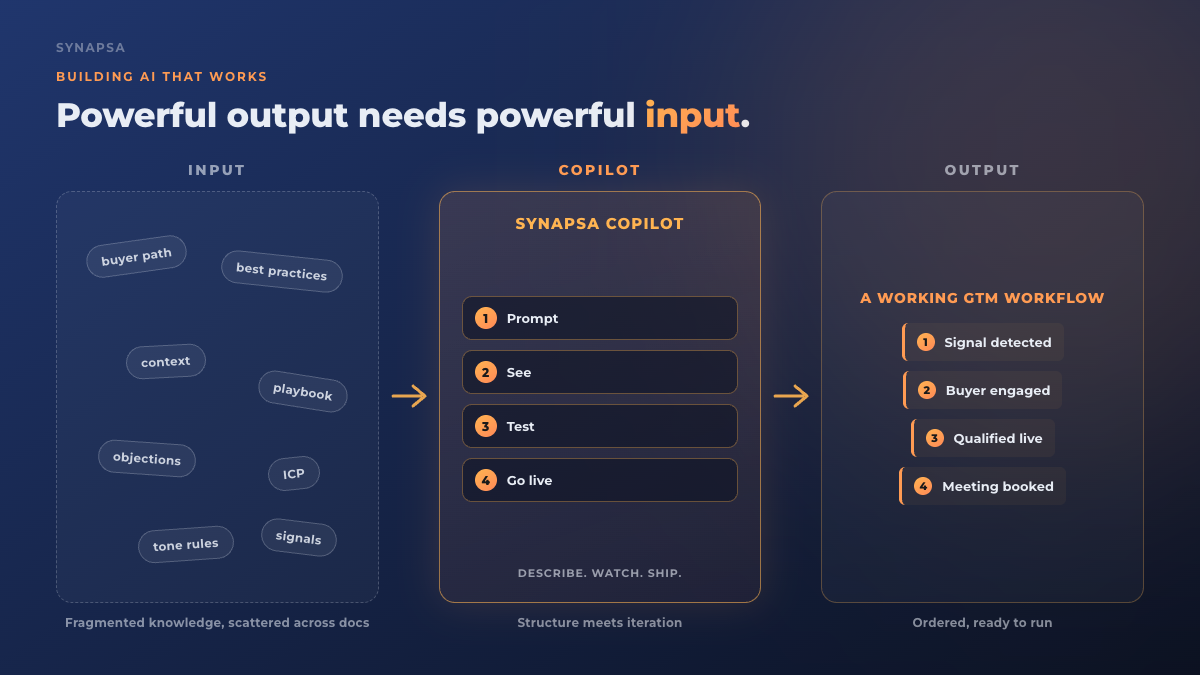
This is the architecture we built into Synapsa V2. Describe your motion in a prompt. The agent configures around it with best practices already in place. Refine with another prompt instead of a deployment ticket. The same plain-language input that builds the workflow updates it when your strategy moves. The point is not the copilot. The point is that AI is not SaaS. SaaS is input and output. AI is replicating a human experience, which requires protocol, personality, context, and timing working together. That kind of system needs an input layer that the human running the strategy can actually use.
What This Looks Like in Practice
What does it feel like when the input layer is solved. Three pieces of customer voice tell the same story.
Vouris Consulting, on what it feels like once the agent is configured correctly: "The craziest part is I do not think about it at all. It just happens." That is the end state. The work that used to require ongoing human attention is now running underneath, because the system was given enough context to operate without intervention.
Sama, on what changes when the AI knows your context: "This does everything that we're not doing today. It's reliable, it's easy to use. I can't imagine us without it right now." Reliable and easy to use are not feature descriptions. They are descriptions of trust. The trust that comes from an agent whose configuration encoded the right strategy, not a generic one.
Talent Edge Recruiting, on speed to value when the input layer is right: "I was really skeptical about this and I did not think it was gonna go well but in the first 30 days, I believe we hit over 75 meetings." Talent Edge had been through a failed AI vendor before us. The pattern we see in that recovery cycle is consistent. The second tool works when the configuration captures the playbook the first tool tried to skip.
The difference between these two outcomes is not the model. The capability gap between vendors is narrow now. The difference is whether the configuration captured what the company actually does. More on what that captures in qualification specifically here.
What to Look For in Any AI Builder
If you are evaluating an AI GTM builder, five questions cut through the output-layer marketing and reveal whether the input layer is solved.
1. Does it know what it needs from you, or does it require you to know what it needs? A real build copilot asks you the structured questions and handles the technical defaults itself. If the intake is a blank canvas, the burden is still on you.
2. Can you describe your buyer path in plain language and have the AI configure itself around it? Not "fill out these 14 fields." Describe the motion. The configuration should follow.
3. Can you test it before going live? A working agent should be observable before it touches a real buyer. If your only options are "off" and "live with everyone," the loop is too long.
4. Can you refine it with a prompt, not a tech ticket? If updating the qualification logic requires a Salesforce admin or a deployment engineer, the strategy will move faster than the configuration ever can.
5. Does it have GTM-specific defaults baked in? A horizontal AI builder that treats your GTM use case the same as a customer support use case will produce generic output. The defaults matter.
The teams that win with AI in GTM are not the ones who buy the most capable agent. They are the ones who can get their actual playbook into the agent the fastest, and refine it without going through a deployment team every time the strategy moves. The output layer is solved. The input layer is the new edge. The agent that knows your playbook is the agent that converts the buyers you already have.
FAQ
What is the input layer in AI GTM configuration?
The input layer is everything the AI needs to know before it can perform: your buyer profile, your qualification logic, your playbook reasoning, your brand voice, your routing rules, and the contextual nuance that lives inside your best reps. Most AI tools focus on output capabilities, what the AI can do. The input layer is what the AI needs to know to do it well for your company specifically.
Why do AI GTM agents fail after initial setup?
The most common failure mode is not a bug in the AI. It is an incomplete transfer of company context at setup. The AI performs the workflow it was configured to run, but the configuration did not encode the actual buyer path, the real qualification criteria, or the tone your buyers respond to. It sounds generic because it was given generic instructions. The fix is a better input process, not a better model.
What is a build copilot for AI GTM workflows?
A build copilot is the layer between you and the raw AI configuration. Instead of asking you to fill out technical fields and build decision trees, it asks you to describe your GTM playbook in plain language, your ICP, your buyer journey, your qualification rules, how you handle objections, and translates that into a working AI workflow with best-practice defaults applied. The goal is to make the input layer feel like talking to a colleague.
How is configuring an AI agent different from using a no-code workflow builder?
A workflow builder connects actions. If this, then that. An AI agent requires context: who is this buyer, what stage of the journey are they at, what does your company's playbook say about this situation. No-code builders solve the technical connection problem. AI agent configuration solves the judgment problem. Judgment requires context. Transferring that context is the input layer challenge.
How long should it take to configure an AI agent for GTM?
With the right build copilot, most teams move from initial setup to first live workflow in hours, not weeks. The complexity is not in the technical wiring. It is in the strategy encoding. If your build copilot knows the right questions to ask, and your GTM leaders can answer them in plain language, the AI can be trained in a single session. The weeks-long onboarding pattern is a symptom of a weak input layer, not a feature of AI configuration.
What is promptable GTM strategy?
Promptable GTM strategy means your AI workflow is configured and refined in plain language. Instead of editing individual nodes in a workflow graph, you describe a change. When a buyer mentions budget concerns, hold off on qualification and send the ROI case study. The AI restructures its behavior accordingly. The same prompt interface that configures the workflow can refine it. No tech tickets. No admin back-and-forth.